DDS QoS Policy Guide
A comprehensive reference for configuring 16 key DDS QoS policies
16 QoS Policies
Lifecycle of DDS Communication
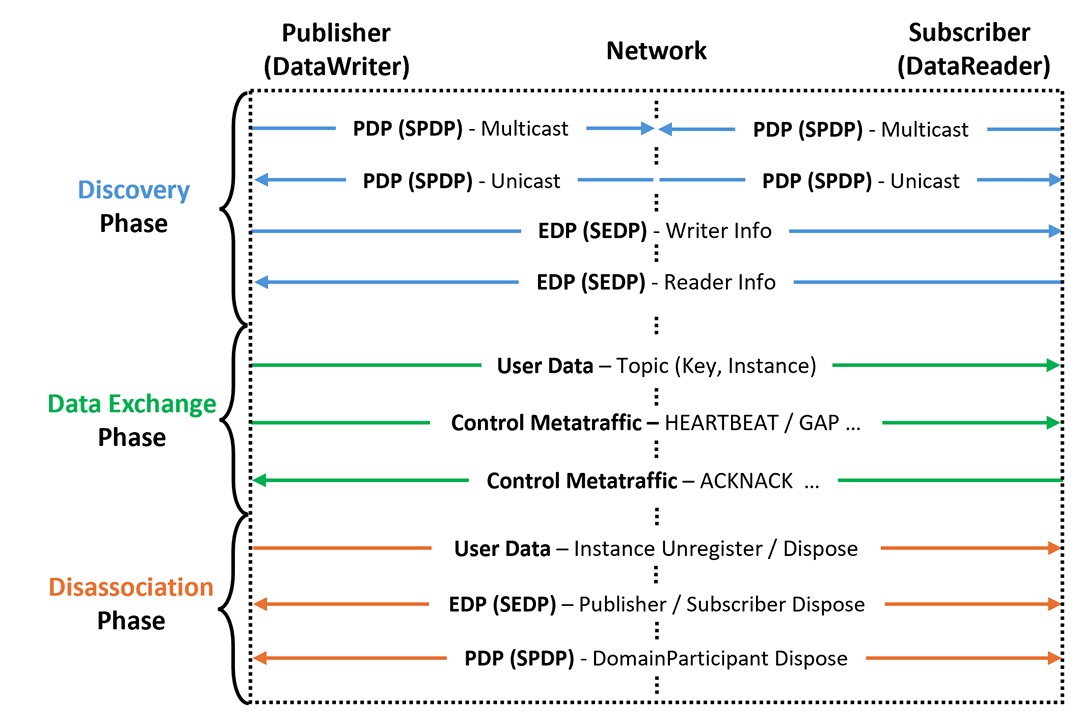
established after verifying QoS compatibility.
ensure reliability and timeliness.
purging all history after a timeout.
Lifecycle Mapping
1. ENTITY FACTORY (ENTFAC)
Controls whether newly created DDS entities automatically start participating in discovery
autoenable_created_entities (default: TRUE)
Mode
- TRUE: Newly created child entities are immediately enabled and begin participating in discovery.
- FALSE: The application must explicitly call enable() before the entity can participate in discovery.
Example
The ENTFAC QoS can be used to conserve resources and allow multiple robots to initiate discovery simultaneously under synchronized conditions. For instance, the Publishers and Subscribers of a navigation module may be activated only after completing local sensor calibration or localization. By setting autoenable created entities=false, the system delays communication until the robot is ready by explicitly calling enable() at the appropriate time
2. PARTITION (PART)
Introduces logical segmentation with in a single DDS domain
names (default: emptystring)
Example
The PART QoS can be used to separate identical data types into multiple logical groups without the need to define additional topics or create new domains. For instance, delivery robots and inventory robots may share common topics such as “status” and “command” within the same domain, but still require distinct data flows. By setting the names=delivery for the delivery robots and names=inventory for the inventory robots, a central management system can subscribe only to the desired partition and selectively receive data from a specific group of robots.
3. USER DATA (USRDATA)
Allows application-specific meta data to be attached to DDS entities such as Domain Participant, Publisher, and Subscriber
value (default: empty sequence)
Example
The USRDATA QoS can be used to flexibly deliver iden tity, authentication, and configuration information without re quiring additional topics or separate domains. For example, each robot may embed value such as robot id=R12 and to ken=ABCD123 in its participant, allowing the server to inspect the token during the SPDP phase and admit only authorized robots while blocking others. Similarly, a Publisher for a LiDAR topic may include value such as sensor=LiDAR and fov=270 in its USRDATA, enabling the subscribing application to determine sensor configuration and immediately select an appropriate filtering strategy before receiving any samples.
4. GROUP DATA (GRPDATA)
Attaches application-specific metadata to the Publisher and Subscriber entities
value (default: empty sequence)
Example
The GRPDATA QoS can be used to logically segment data f lows in a manner similar to the PART QoS. For example, if delivery and inventory robots share topics within the same domain, assigning value=delivery or value=inventory to each Publisher or Subscriber allows the central management server to read these values during discovery callbacks. Although similar to PART, the key distinction is that PART enforces matching at the DDS level, whereas GRPDATA leaves the interpretation of the field entirely to the application.
5. TOPIC DATA (TOPDATA)
Attaches application-specific metadata to the topic entity
value (default: empty sequence)
Example
The TOPDATA QoS can be used by applications to verify schema compatibility in advance. For example, each robot can embed value such as schema=2.1 and frame=lidar in the TOPDATA of the scan cloud topic. During topic discovery, an inventory management application can read this information, and if the schema is incompatible, it can prevent subscription and avoid data parsing errors.
6. RELIABILITY (RELIAB)
Determines whether entities such as topic, Publisher, and Subscriber transmit data reliably
kind (default: Publisher-reliable, Subscriber-best_effrot)
max blocking time
kind Mode
- RELIABLE: Attempts to deliver all samples stored in the Publisher HistoryCache to the Subscriber.
Retransmissions occur upon request using ACK/NACK signaling.
(max blocking time limits how long a Publisher’s write() or dispose() operation can be blocked due to delayed ACKs or buffer unavailability.) - BEST_EFFORT: Publisher does not wait for ACKs and does not retransmit lost samples.
Example
The RELIAB QoS can be used to balance safety and efficiency by configuring topics according to their criticality. For commands such as emergency stops or task assignments, both Publisher and Subscriber should use reliable, ensuring guaranteed delivery. In contrast, high-frequency data such as LiDAR scans or camera streams can use best effort, which avoids retransmission overhead and tolerates occasional loss.
7. DURABILITY (DURABL)
Determines how a late-joining Subscriber can receive previously published samples from a Publisher
kind (default: VOLATILE)
kind Mode
- VOLATILE: Does not send any previous samples to newly joined Subscribers.
- TRANSIENT_LOCAL: Retains samples in the Publisher’s HistoryCache while it is active, allowing late-joining Subscribers to access previously published data.
- TRANSIENT: Preserve data after a Publisher has been terminated. Retains data in volatile memory.
- PERSISTENT: Preserve data after a Publisher has been terminated. Uses non-volatile storage such as files or databases
Example
The DURABL QoS can be used to allow newly added or recovered robots to immediately access the same information, thereby improving both system robustness and collaborative efficiency. Data such as global maps or mission plans, whose availability must not depend on the lifespan of a specific robot, should remain accessible to robots that join after the Publisher has terminated or rebooted. In such cases, DURABL should be set to transient if data must persist throughout process restarts, or to persistent if it must survive system-wide reboots.
8. DEADLINE (DEADLN)
Specifies the maximum interval within which a new sample for a given data instance must be produced by the Publisher and received by the Subscriber
period (default: infinity)
Example
The DEADLN QoS can be used for real-time monitoring of robot status. Each robot may publish its position and battery level through ROS 2 topics every second. The Publisher and the central monitoring system’s Subscriber are both configured with a period of 1 second. If a new sample fails to arrive within this interval, the monitoring system receives a deadline-miss notification, enabling immediate detection of communication failures or faults in that data stream. The application can then respond by issuing alerts or stopping the robot, thereby enhancing overall system safety and reliability.
9. LIVELINESS (LIVENS)
Determine whether its corresponding Publisher is still active
kind (default: AUTOMATIC)
lease_duration (default: infinite)
kind Mode
- AUTOMATIC: The DomainParticipant asserts liveliness implicitly by periodical liveliness assertions.
- MANUAL_BY_PARTICIPANT: A single assertion from any entity within a DomainParticipant marks all of its Publishers as alive.
- MANUAL_BY_TOPIC: Each Publisher must explicitly assert its own liveliness by publishing HEARTBEAT samples or calling assert liveliness().
Example
The LIVENS QoS can be used to verify whether the pub lishing process itself is still active, whereas the DEADLN QoS ensures the timely delivery of individual data samples. This policy enables a central monitoring system to automatically track the operational status of each robot. For instance, each robot may publish position and battery level via a Publisher. The central Subscriber is configured with kind set to automatic and lease duration set to 5 seconds, causing DDS to refresh liveliness every five seconds. If a signal is not received within the lease duration, a liveliness notification is triggered to indicate that the robot is inactive. The monitoring application can then respond by graying out the robot’s icon on the map or issuing a warning.
10. HISTORY (HIST)
Determines how many samples a Publisher retains in its HistoryCache for retransmission, and how many samples a Subscriber stores before they are delivered to the application.
kind (default: KEEP_LAST, depth=1)
kind Mode
- KEEP_LAST: Retains only the most recent samples per instance, with depth specifying the maximum number of samples to keep.
- KEEP_ALL: Stores all samples for each instance and attempts to deliver as many as possible.
Example
The HIST QoS can be used to control how much robot data is retained. If a control station must preserve all robot positions since startup, kind=keep all can be set so that both the Publisher and the Subscriber store every sample. In contrast, for real-time tracking where only the latest position matters, setting kind=keep last with depth=1 ensures that each robot’s Publisher retains and transmits only the most recent position, while the Subscriber receives only that single value.
11. RESOURCE LIMITS (RESLIM)
Defines upper bounds on the number of instances and samples that the topic, Publishe, and Subscriber entities can manage
max_samples
max_instances
max samples per instance
Example
The RESLIM QoS can be used to manage resources and maintain communication stability. For instance, where only the most recent information is important and historical records are less critical, such as a robot’s real-time position, the Publisher’s max instances can be set to a small value to avoid excessive memory usage. On the Subscriber side, where the number of participating robots may be large or variable, the max samples per instance value should be set high enough to keep minimal data for each robot instance.
12. LIFESPAN (LFSPAN)
How long a sample published by a Publisher remains valid
duration (default: infinity)
Example
The LFSPAN QoS can be used to prevent robots from retaining outdated samples unnecessarily. For data such as po sition or battery level, where only the last few seconds matter, setting the duration accordingly ensures that the Publisher’s HistoryCache stores only the most recent samples, with older ones automatically deleted to conserve memory. In contrast, for data such as command logs– where long-term delivery is more important than freshness– it is preferable to set duration to infinity and rely on other QoS policies to ensure reliability.
13. OWNERSHIP (+STRENGTH) (OWNST)
Whether multiple Publishers can concurrently update the same instance, or, if not, which Publisher’s value should be accepted
kind (default: SHARED)
kind Mode
- SHARED: Allows multiple Publishers to freely update the same instance.
- EXCLUSIVE: Only a single Publisher is allowed to update an instance, and its updates alone are delivered to Subscribers.
Priority is determined by the value of the OWNST STRENGTH QoS policy.
Example
The OWNSTandOWNERSHIP STRENGTHQoSpolicies can be used to manage shared resources or mission states con sistently. For example, if multiple robots scan the environment simultaneously to build a shared map, shared mode allows the server to receive updates from all robots and generate a unified map. In contrast, for tasks that must be performed by a single robot, exclusive mode can be used with appropriate value assigned to each Publisher, ensuring that the active robot becomes the instance owner. If the current owner robot fails to respond due to a fault, DDS automatically transfers ownership to the standby robot with the next highest value, allowing the task to continue without interruption.
14. DESTINATION ORDER (DESTORD)
How a Subscriber orders samples from multiple Publishers targeting the same instance
kind (default: BY_RECEPTION_TIMESTAMP)
Mode
- BY_RECEPTION_TIMESTAMP: Orders samples by their reception time at the Subscriber.
- BY_SOURCE_TIMESTAMP: Uses the timestamp assigned by the Publisher at publication, preserving the original creation order regardless of delays.
Example
The DESTORD QoS policy can be used to maintain data consistency when multiple robots simultaneously update the same instance. By configuring by source timestamp, samples are ordered by their creation time regardless of network delays or arrival order, allowing all robots to share a consistent view of the map. In contrast, for real-time data such as current posi tions, where the latest received value is most important, using by reception timestamp enables the Subscriber to reflect the earliest arriving sample immediately.
15. WRITER DATA LIFECYCLE (WDLIFE)
whether a Publisher should notify Subscribers with a dispose() when it unregisters an instance
autodispose unregistered instances (default: TRUE)
Mode
- TRUE: An instance to be automatically marked as disposed when an unregister() is called, so that it is recognized as deleted on the Subscriber side.
- FALSE: The unregister() only disassociates the writer from the instance without disposing of it; the application must explicitly call dispose() to fully delete the instance.
Example
The WDLIFE QoS can be used to explicitly manage the lifecycle of object-based tasks. For example, when a robot detects an object with its sensors, it can publish the object’s key, position, type, and status on a topic, allowing other robots or the control system to subscribe and build a shared environment model. When the task is completed, the post processing behavior depends on the detecting robot’s autodis pose unregistered instances setting. If true, the instance is immediately disposed of and removed from the map or marked as “processed”; if false, only the Publisher-instance link is removed while the object information remains active, allowing another robot to rediscover and update the same object, thereby improving collaboration flexibility.
16. READER DATA LIFECYCLE (RDLIFE)
How long a Subscriber retains samples that have been disposed of or are no longer associated with any Publisher
autopurge disposed samples delay (default: infinity)
autopurge no writer samples delay (default: infinity)
Example
The RDLIFE QoS policy enables tiered instance man agement for improved efficiency. For example, in a tempo rary storage area where hundreds of pallets move quickly and historical positions become obsolete immediately, set ting autopurge disposed samples delay to 0 seconds ensures that the cache is cleared as soon as a robot calls dis pose(). This keeps the cache lightweight and prevents un necessary memory growth. In contrast, for static, critical objects awaiting inspection after relocation, setting autop urge no writer samples delay to 300 seconds allows newly joined robots to continue inspection even after brief com munication interruptions. By adjusting the reader-side delay values based on context, essential data can be preserved while irrelevant information is promptly discarded, ensuring efficient use of system resources.